
Introduction: Why Accurate TV Measurement Matters
TV size impacts your viewing experience directly. Get it wrong, and you face eye strain or a cramped setup. Accurate measurement ensures the screen fits your space and distance.
In 2025, average how to measure tv size continue to grow. In North America, screens average around 55 inches, up from earlier years. Globally, preferences lean toward larger models, with 60% of consumers choosing over 55 inches. This guide covers precise steps to measure and calculate for your needs.
Start with the basics: TV size refers to the diagonal screen length in inches. Ignore the frame. This prevents common regrets like buying too big for a small room.
1. What TV Size Really Means (Demystifying Diagonal Measurements)
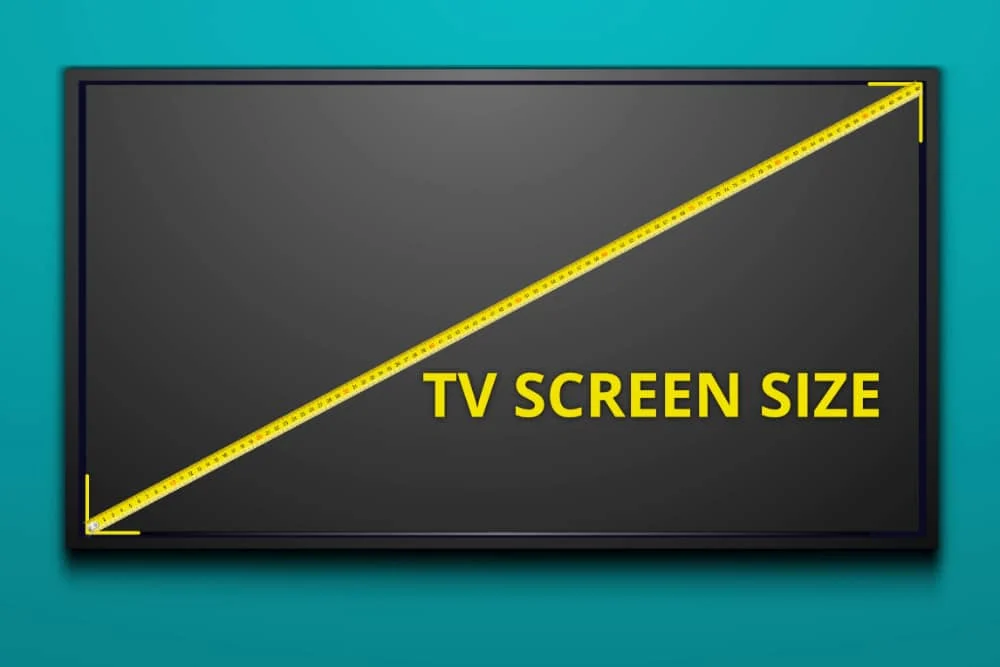
TV manufacturers list sizes as the diagonal span of the viewable screen. This excludes the bezel, the thin border around it. For example, a 55-inch TV measures 55 inches from one corner to the opposite.
Most TVs use a 16:9 aspect ratio. This means for every 16 units wide, it’s 9 units high. A 55-inch screen is typically 48 inches wide and 27 inches tall.
Convert to centimeters by multiplying inches by 2.54. A 55-inch TV becomes about 140 cm diagonally. This helps if shopping internationally or fitting metric furniture.
Now that you know the core definition, let’s grab the tools to measure accurately.
2. Tools You’ll Need and Step-by-Step Measuring Process
You’ll need a soft tape measure for flexibility. A notepad helps record numbers. Avoid rigid rulers; they skip curves on edges.
how to measure tv size :
Step 1: Turn off and unplug the TV. This keeps things safe.
Step 2: Place the tape at the bottom-left screen corner. Stretch to the top-right corner. Note the inches—that’s your size.
Step 3: Measure width from left to right screen edges. Do the same for height, top to bottom.
Step 4: Check depth from front to back, including any stand. Measure the full outer diagonal if fitting into a cabinet.
These steps ensure you capture all dimensions. Next, see how popular sizes translate in real terms.
3. TV Size Chart: Dimensions for Popular Models
Use this chart for quick reference. It lists diagonal sizes with approximate widths and heights for 16:9 ratios. Values are in inches and centimeters.
| Size | Width (in/cm) | Height (in/cm) | Best For |
|---|---|---|---|
| 32″ | 28″/71cm | 16″/41cm | Bedrooms or kitchens with limited space |
| 55″ | 48″/122cm | 27″/69cm | Standard living rooms |
| 65″ | 57″/145cm | 32″/81cm | Family rooms or home offices |
| 75″ | 66″/168cm | 37″/94cm | Spacious open areas |
| 85″ | 74″/188cm | 42″/107cm | Dedicated media rooms or large walls |
These are based on standard models. For 4K TVs, closer viewing works due to higher resolution. In China, averages hit 63 inches in 2025, showing a trend toward bigger screens.
With these dimensions in mind, factor in how far you’ll sit from the TV.
4. Calculate Your Ideal Viewing Distance: Formulas That Work
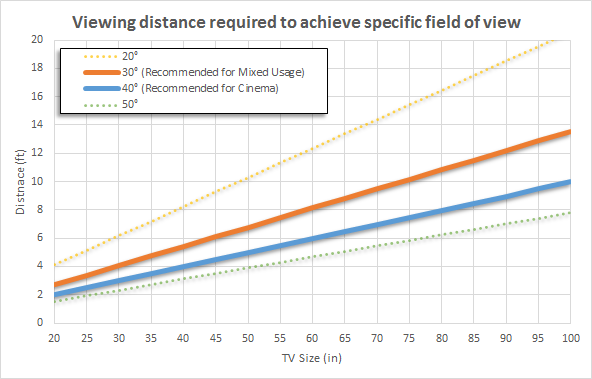
Viewing distance prevents discomfort. For 4K TVs, use: distance (inches) = TV size × 1.6. This gives a 30-degree field of view.
Example: A 55-inch 4K TV? Sit about 88 inches (7.3 feet) away.
For HD TVs, multiply by 3.2 to avoid seeing pixels. A 65-inch HD needs 208 inches (17.3 feet)—often impractical, so opt for 4K.
Adjust for content. Movies suit 40 degrees: distance = TV size × 1.2. Sports or gaming? Stick to 30 degrees to reduce motion blur risks.
These formulas come from viewing science. They ensure immersion without strain. Now, consider height for the full setup.
5. Optimal Viewing Height and Mounting Hacks
Eye level matters for comfort. Mount so the screen center sits at 40-42 inches from the floor when seated.
For beds or recliners, aim higher—60-70 inches—with a tilt mount. This angles the screen down.
Check VESA patterns: Holes on the TV back, like 400x400mm for 55-inch models. Use a stud finder for secure wall mounting.
Cable management: Leave 2-3 inches behind for plugs. These hacks solve placement issues. Next, tailor to your room type.
6. Room-Specific Sizing: Solve Fit Issues by Scenario
Small rooms under 150 square feet suit 40-50 inches. Measure wall space first to avoid overwhelming the area.
Medium living rooms, 150-250 square feet, handle 55-65 inches. Test with a cardboard cutout taped to the wall.
Home theaters over 250 square feet fit 75 inches or more. Account for sound and light—larger screens amplify echoes.
Multi-use spaces? Choose modular stands for movement. Skip if pets or kids risk tipping. Wikipedia details television set evolution, including size trends. Adapt these to your layout for best results.
Knowing room fits leads to avoiding pitfalls.
7. 5 Common Measurement Mistakes and How to Fix Them
Mistake 1: Including the bezel in screen size. Fix: Measure only the lit area.
Mistake 2: Skipping depth checks. Fix: Add 2-4 inches for cables and ventilation.
Mistake 3: Ignoring resolution impact. Fix: 8K allows closer seats than HD.
Mistake 4: No pre-purchase simulation. Fix: Use free apps like TV Size Simulator.
Mistake 5: Overlooking return policies. Fix: Shop retailers with 30-day trials.
These errors affect 30-40% of buyers, per common reports. Correct them for a smooth setup.
Conclusion: Measure Smart, Watch Better
how to measure tv size Accurate TV measurement starts with diagonal screen size. Use tools, charts, and formulas for fit and distance. Avoid mistakes by double-checking dimensions.
Share your room size in comments for tips. Consider 4K upgrades as sizes grow in 2025. This approach delivers value beyond basic guides.